Hands-on with Claude Code & Cline
What we'll actually do today
An introduction to the two agentic coding assistants this course uses. Less slide, more building: you'll open one project in Claude Code or Cline and extend it four ways — agent, skill, tool, hook — then watch a grounded filing agent run end to end.
code/practicals/04-llm-agents/ — copy-ready skeletons live in
templates/, the live agents in .claude/.
- Meet the tools (10 min) — install, open the folder, the file-based pattern
- The capability map (10 min) — agents, skills, tools, hooks + the standard tools
- Add an agent & a skill (15 min) — from the templates, in both setups
- Wire two hooks (10 min) — an audit log and a timed safety commit
- Run the agent (10 min) —
/aska grounded, graded filing question - Discussion (5 min) — when to add an agent vs. a hook
Meet Claude Code & Cline
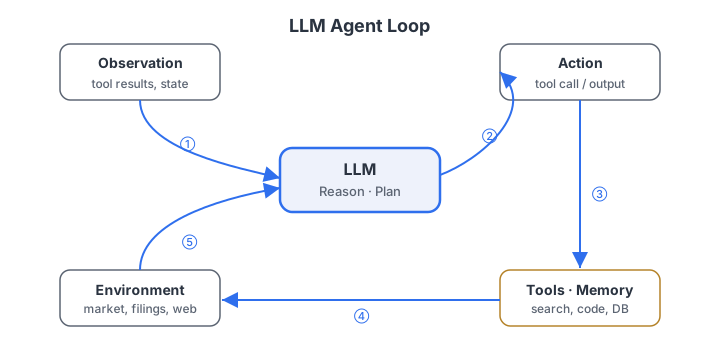
Same loop you saw in the lecture — wrapped around your codebase
Both are the Perceive → Reason → Act loop from the lecture, with your repository as the environment. The model proposes actions (read a file, run a command); the tool executes them and feeds the result back.
.claude/;
a native hook engine fires scripts on lifecycle events. Install:
npm i -g @anthropic-ai/claude-code, then run claude in the folder.
.clinerules /
AGENTS.md, runs workflows, and connects tools over MCP. Install from the
VS Code marketplace, open the folder, point it at a model provider.
AGENTS.md runners) the same way.
Every capability is a plain-text file — readable, diffable, auditable
There is no hidden configuration. An agent, a skill, and a hook are each a tracked file a reviewer can read in a pull request. In a regulated workflow, the entire capability surface is inspectable from a git log.
code/practicals/04-llm-agents/
├── CLAUDE.md / AGENTS.md          # project instructions (both tools read these)
├── .clinerules                    # Cline's project rules
├── .claude/
│   ├── settings.json              # permissions + HOOKS wiring
│   ├── agents/  retriever.md analyst.md grader.md
│   ├── skills/  ask/SKILL.md      # the /ask command
│   └── hooks/   log-interaction.sh  timed-commit.sh
├── templates/                     # copy-ready skeletons (today's exercises)
└── tools/  retrieve.py grade.py   # deterministic Python the agent calls
The capability map
Where each capability actually lives
The same four extension points, mapped to concrete file locations in each tool. Today you'll add one of each.
| Capability | Claude Code | Cline |
|---|---|---|
| Agent — a persona | .claude/agents/<name>.md | .clinerules / AGENTS.md, or a custom mode |
Skill — a /command | .claude/skills/<name>/SKILL.md | .clinerules/workflows/<name>.md |
| Tool — a new action | MCP in .mcp.json, or a CLI via Bash | MCP in cline_mcp_settings.json |
| Hook — an event callback | .claude/settings.json + .claude/hooks/ | none native → git / MCP wrapper |
You rarely build a tool — the standard ones ship with both
Before you reach for a custom tool, remember both assistants already act on your repo through a shared standard toolset. A custom tool is only for what the environment can't already do.
Read— open a fileEdit/Write— change or create filesGrep— regex search across the repoGlob— find files by name patternBash— run any shell command (incl. your Python tools)
- A live pricing / market-data API
- An internal database or document store
- A deterministic engine — a DCF, a bond pricer, a risk score
tools/ (retrieve.py,
grade.py), called via Bash. Deterministic code does the
arithmetic; the model only chooses inputs and reads outputs — never recalls a number.
Add an agent & a skill
Copy the agent template and give it one job
An agent is a persona with a single responsibility, allowed tools, and one artifact it must
produce. Start from templates/claude/agent.md (or
templates/cline/agent.md).
---
name: risk-extractor
description: Extract the risk factors from a filing chunk as a bullet list. Use when asked "what risks…".
tools: Read, Grep
---
You are a risk-factor extractor. Read the retrieved chunks in reports/_context.json and
list each distinct risk as one bullet, citing the chunk id. Invent nothing; if no risks
appear in the context, say "No risk factors in the retrieved text."
.claude/agents/risk-extractor.md. Claude auto-discovers it and can
delegate to it based on the description.
.clinerules (or
.clinerules/risk-extractor.md) — Cline reads it as a project rule.
Package a repeatable workflow behind a /command
A skill names an ordered procedure you can invoke by typing /name.
In Claude Code it's a SKILL.md; in Cline it's a workflow file — same idea.
# .claude/skills/risk-brief/SKILL.md   →   invoke with  /risk-brief "<company>"
---
name: risk-brief
description: Retrieve, extract, and grade a one-paragraph risk brief. Usage /risk-brief "<company>"
---
1. python -m tools.retrieve "<company> risk factors" -k 4 > reports/_context.json
2. Delegate to the risk-extractor agent to list the risks with citations.
3. python -m tools.grade ... ; if faithfulness < 0.7, revise.
4. Save to reports/<company>-risks.md.
.clinerules/workflows/risk-brief.md and run
/risk-brief. Skeleton: templates/cline/workflow.md.
Wire two hooks
An audit log and a timed safety commit
A hook is a shell script wired to a lifecycle event in .claude/settings.json.
Both scripts already exist in .claude/hooks/; you just wire and observe them.
logs/llm-interactions.log — the audit trail, made real.
// .claude/settings.json
"hooks": {
  "UserPromptSubmit": [{ "hooks": [{ "type": "command", "command": ".claude/hooks/log-interaction.sh" }]}],
  "PostToolUse":      [{ "hooks": [{ "type": "command", "command": ".claude/hooks/log-interaction.sh" }]}],
  "Stop":             [{ "hooks": [{ "type": "command", "command": ".claude/hooks/timed-commit.sh" }]}]
}
Watch them fire — then do it without native hooks
- Ask any question, then
tail -f logs/llm-interactions.log— one line per turn. - Keep working past 15 min → a
chore: timed safety commitappears ingit log. - A non-zero PreToolUse hook can block an action — that's how a compliance gate works.
- Timed commit: run the same script in a watch loop —
while true; do bash .claude/hooks/timed-commit.sh; sleep 300; done - Logging: use Cline's task history, or wrap tools behind an MCP server that logs each call.
templates/cline/git-hooks-README.md.
Run the agent end to end
One command runs the whole Perceive → Reason → Act → Check loop
The bundled agent retrieves the most relevant chunks, writes a cited answer, grades it for faithfulness and relevance, and revises if it drifted off the source — entirely offline.
/ask "What is NovaCorp's customer concentration risk?"

# under the hood, the skill runs:
python -m tools.retrieve "customer concentration risk" -k 4 > reports/_context.json
# analyst agent drafts a cited answer from _context.json
python -m tools.grade --question "..." --answer "..." --context reports/_context.json
# if faithfulness < 0.7 → revise or answer "Not answerable from the available filings"
retriever → analyst →
grader, each a one-job agent in .claude/agents/.
Things to try in the last ten minutes
- Ask something the filings don't cover — e.g. "What was net income?" The agent must answer "Not answerable from the available filings," not guess.
- Starve retrieval — drop
-kto 1 and watch relevance fall. - Force a hallucination — make the analyst cite a number that isn't in the context, then run the grader and watch faithfulness drop and the loop send it back.
- Add your
/risk-briefskill from Exercise 2 and run it on NovaCorp. - Check the audit log — every step you just ran is one line in
logs/llm-interactions.log.
python -m pytest -q.
When would you add a second agent — or a hook?
- the task splits into sub-tasks with different tool needs
- you need a critic / compliance checker separate from the generator
- parallelism can cut latency
- a cross-cutting concern (audit, cost) must touch every action
- the concern is owned by a different team than the agent developer
- you must enforce a policy without editing the agent's core logic
Five takeaways to carry out of the lab
- An agentic IDE is plain files under version control. Agents, skills, tools, and hooks are all text you can read, review, and diff.
- The pattern transfers. Claude Code's
.claude/and Cline's.clinerulesexpress the same four capabilities. - You rarely build a tool.
Read,Grep,Bash& friends ship in; MCP is for what the environment can't already do. - Hooks are deterministic guardrails. Native in Claude Code; pushed down to git / MCP in Cline. The model can't skip them.
- Grounding beats memory. Deterministic tools compute; the agent cites; the grader blocks unfaithful answers.
Appendix — stretch problem
Promote a Python tool to an MCP server
Right now the agent calls tools/grade.py via Bash.
Expose it as a first-class MCP tool so both Claude Code and Cline can call it by name with a typed schema.
- Wrap
grade(question, answer, context)in a small MCP server - Give it a JSON input schema:
question,answer,context_path - Return
{faithfulness, relevance}as structured output
- Claude Code: add the server to
.mcp.json - Cline: add it to
cline_mcp_settings.json - Re-run
/askand confirm the grader is now a typed tool call, not a shell command
Bash call.